
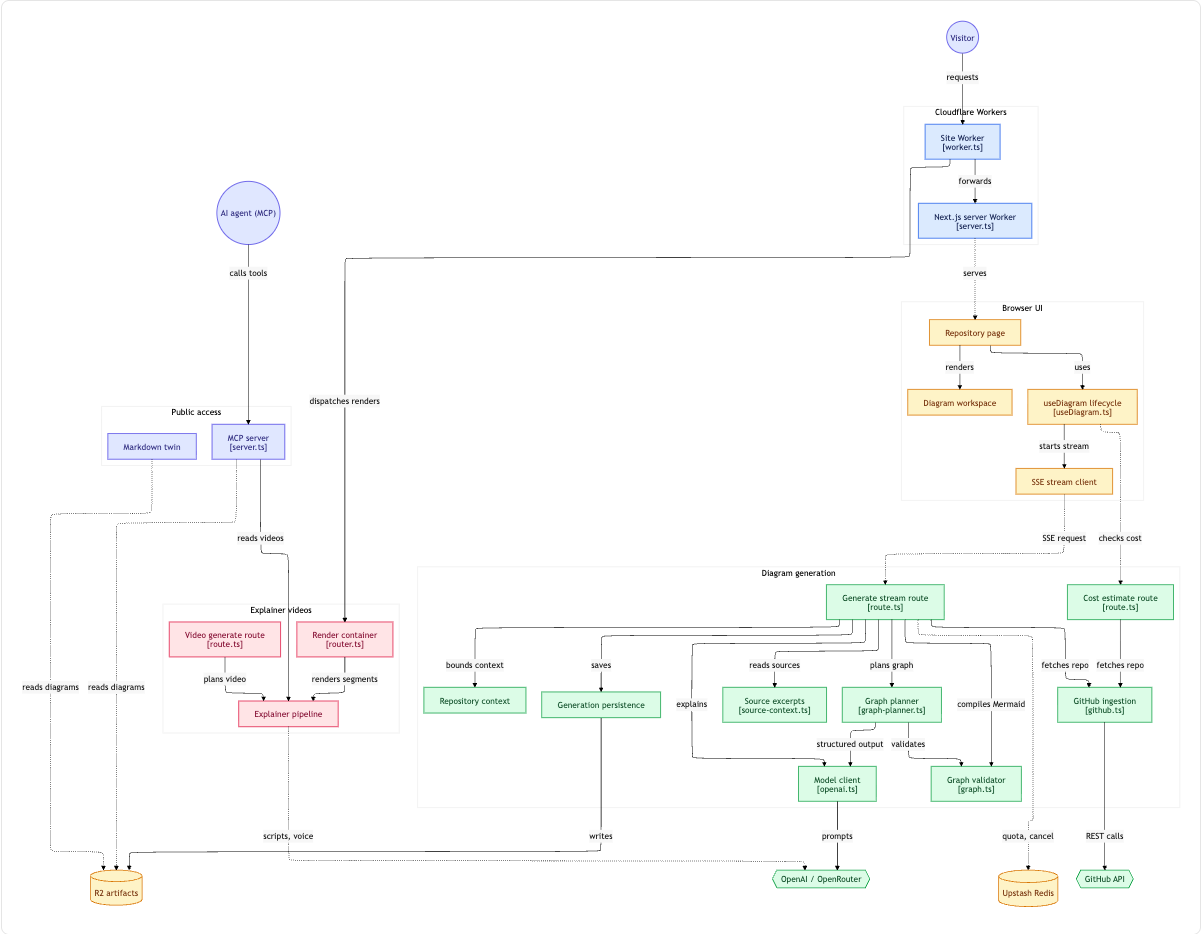
I use GitDiagram a lot. You swap hub for diagram in a GitHub URL and get an interactive architecture diagram of the repo. It's a quick way to get your bearings in a codebase you don't know.
It only works on GitHub repos, though, and a private one means connecting your GitHub account. I wanted the same thing for work repos on my own machine, without sending code anywhere new. So I read how GitDiagram works and rebuilt the pipeline as a skill for Claude Code.
GitDiagram is open source
My first plan was to reverse engineer the live site. That turned out to be unnecessary, because GitDiagram is MIT licensed and the source is on GitHub. I read the code, then checked a couple of live endpoints to make sure production matched what was in the repo.
It's a Next.js app running on Cloudflare Workers. The interesting part isn't the hosting, though. It's how little of the work is left to the model.
The pipeline, step by step
1. Fetch the repository. It pulls the file tree and README from the GitHub API. Images, lock files, compiled output and folders like node_modules are dropped straight away.
2. Choose which files to read. This is where most of the cleverness is. Every source file gets a score based on its name and size. Files called things like router, worker, pipeline or handler score higher. Tests, scripts, logging and tiny re-export files score lower. There's also a diversity penalty, so twenty sibling route files can't push the rest of the app out.
The top 12 files get excerpted for the model. The next 28 are read only to see what they import. The budgets are tight: about 48,000 characters of source, 24,000 of file tree and 8,500 of README.
3. Build a source index. Before the excerpts, the model gets a computed list of every file that was read and what it imports. It also flags the "core modules", the largest and most imported files. The model is told that an arrow in the diagram has to be backed by something in this index, an excerpt or the README.
4. One model call. A single request returns a short overview plus a graph as JSON: groups, nodes and edges. Each node carries a real file path, and each edge carries the file that proves it exists. The prompt is detailed about edges. The code that makes a call owns the arrow, you don't chain siblings into an invented pipeline, and a dashed line means optional or unverified.
5. Validate. The server checks the graph. Duplicate IDs or arrows pointing at nodes that don't exist go back to the model with the errors listed, up to three attempts in total. A file path that doesn't exist only costs the node its link, so it's quietly removed rather than triggering another (paid) model call. Each edge's evidence is also checked against the files that were actually read.
6. Compile and render. Plain deterministic code turns the graph into a Mermaid flowchart, adds colours by group and makes each node link to its file on GitHub. The browser draws it with Mermaid's ELK layout.
What I took from it
The model does one job: judgement. It decides what the components are and how they relate. Everything around it is ordinary code. Choosing files, checking paths, escaping text and building the diagram are all deterministic, testable and cheap.
That split is what makes the output trustworthy. The model can't invent a file path that survives validation, and it can't claim a connection without pointing at the code that shows it. If you're building anything with an LLM in the middle, that's a pattern worth copying.
Rebuilding it as a Claude Code skill
Claude Code skills are folders of instructions and scripts that Claude loads when a task matches. The design followed naturally from the split above: Claude Code is the model, and the deterministic steps become two small Python scripts with no dependencies.
collect_context.pyruns steps 1 to 3 against a local checkout. It usesgit ls-files, so.gitignoreis respected, and keeps GitDiagram's budgets and scoring.- Claude reads the result with GitDiagram's prompt and writes the graph JSON.
compile_diagram.pyruns steps 5 and 6. If the graph is broken it exits with a list of issues for Claude to fix, the same repair loop GitDiagram uses. Otherwise it writes an HTML page, a Markdown file and the raw Mermaid.
Nodes link to GitHub when the repo's remote is on GitHub, and open the file in VS Code when it isn't. You don't need a GitHub token or an API key, and nothing leaves your machine except what Claude Code already sends.
The image at the top of this post is the skill run against GitDiagram's own repo.
A bug worth knowing about
My first render showed one node as AI agent &(MCP) instead of AI agent (MCP).
GitDiagram escapes characters like brackets and quotes as HTML entities, and its newer version of Mermaid decodes them again. The version I pinned, and GitHub's own Mermaid renderer, show them as raw text when HTML labels are turned off. My fix was to swap the risky characters for safe look-alikes instead of escaping them, which renders the same everywhere.
If you generate Mermaid yourself and see entities in your labels, check your version and the htmlLabels setting.
Try it
The skill is on GitHub: ykehinde/repo-diagram.
git clone git@github.com:ykehinde/repo-diagram.git ~/.claude/skills/repo-diagram
Then open Claude Code in any repo and ask it to diagram the architecture. You can also give it a GitHub URL and it will clone the repo first.
All credit for the approach goes to Ahmed Khaleel and GitDiagram. If you only need diagrams of public repos, the hosted version is great, and it adds things a local skill can't, like narrated video walkthroughs.
If you try the skill on your own codebase, I'd like to hear how the diagram compares with what you'd have drawn yourself. Issues and pull requests are welcome.