
Overview
F1 Fantasy Edge is a personal project built to solve a real problem I had as an F1 Fantasy player: there is no good tool for quickly understanding which drivers and constructors deliver the best value for money based on historical race data. The official game gives you prices and a budget — the research is entirely on you.
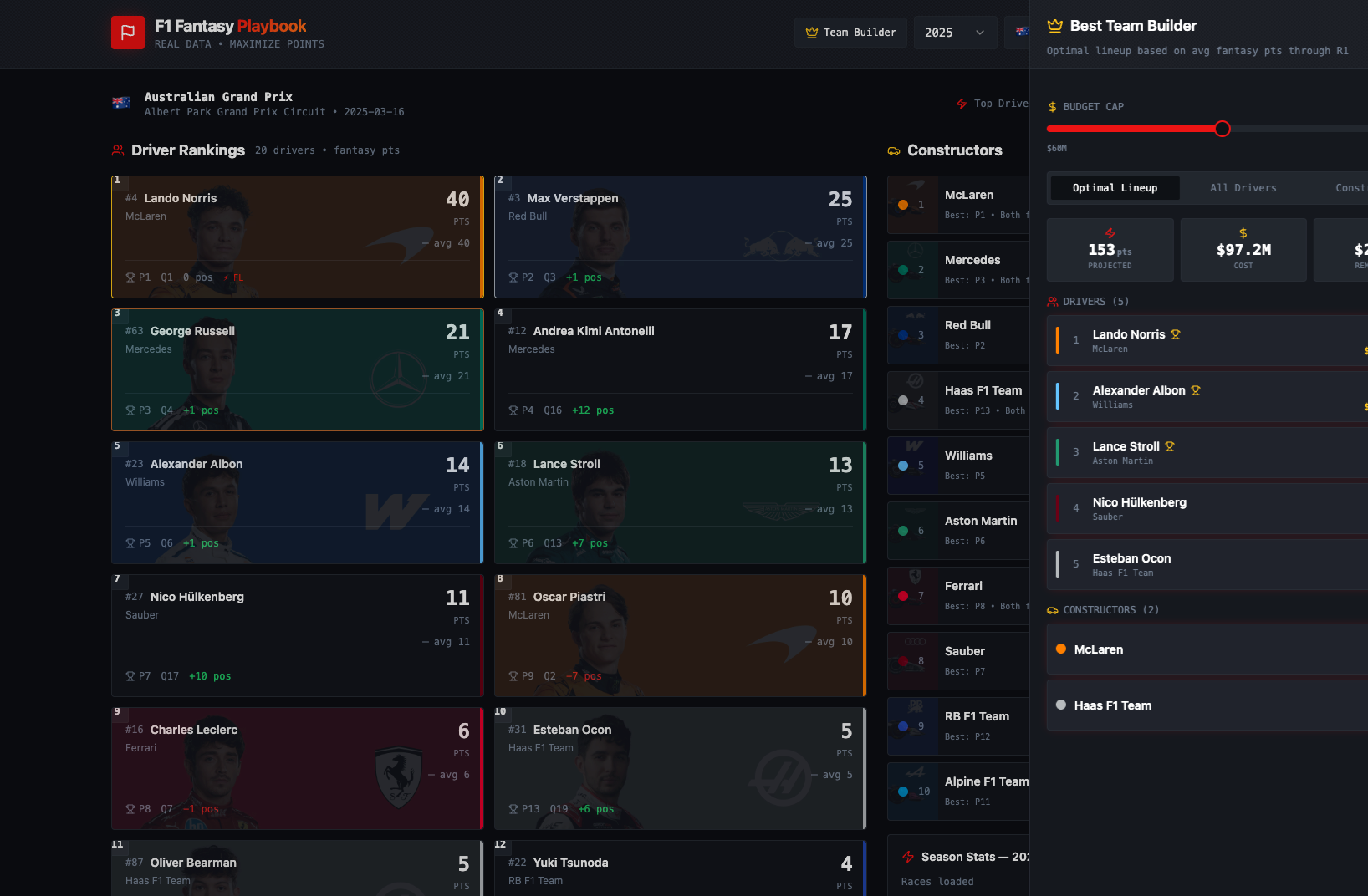
The app pulls live race data from the Jolpica F1 API, calculates fantasy points per race using the official scoring system, and presents the results in a clean, sortable interface alongside a Team Builder that optimises a full 5-driver, 2-constructor lineup within the 2026 budget cap.
The project was also a deliberate experiment in AI-assisted development: I used GitHub Copilot throughout to explore the codebase, make multi-file edits, and generate boilerplate — tracking where it accelerated the work and where I still had to lead.
The Problem
F1 Fantasy gives every player the same 22 drivers, 11 constructors, a budget cap, and a blank spreadsheet. Making good picks means:
- Manually parsing 4 seasons of race-by-race results across 22+ drivers
- Working out who scores consistently versus who gets lucky in a single race
- Balancing budget so your 5 drivers and 2 constructors actually fit within the cap
- Keeping up with a 2026 grid that includes three new teams (Cadillac, Audi, Racing Bulls) and several driver seat changes
Most players guess, copy the popular picks, or spend hours on community spreadsheets. I wanted an app that did that work automatically.
What the App Does
Race-by-Race Fantasy Breakdown
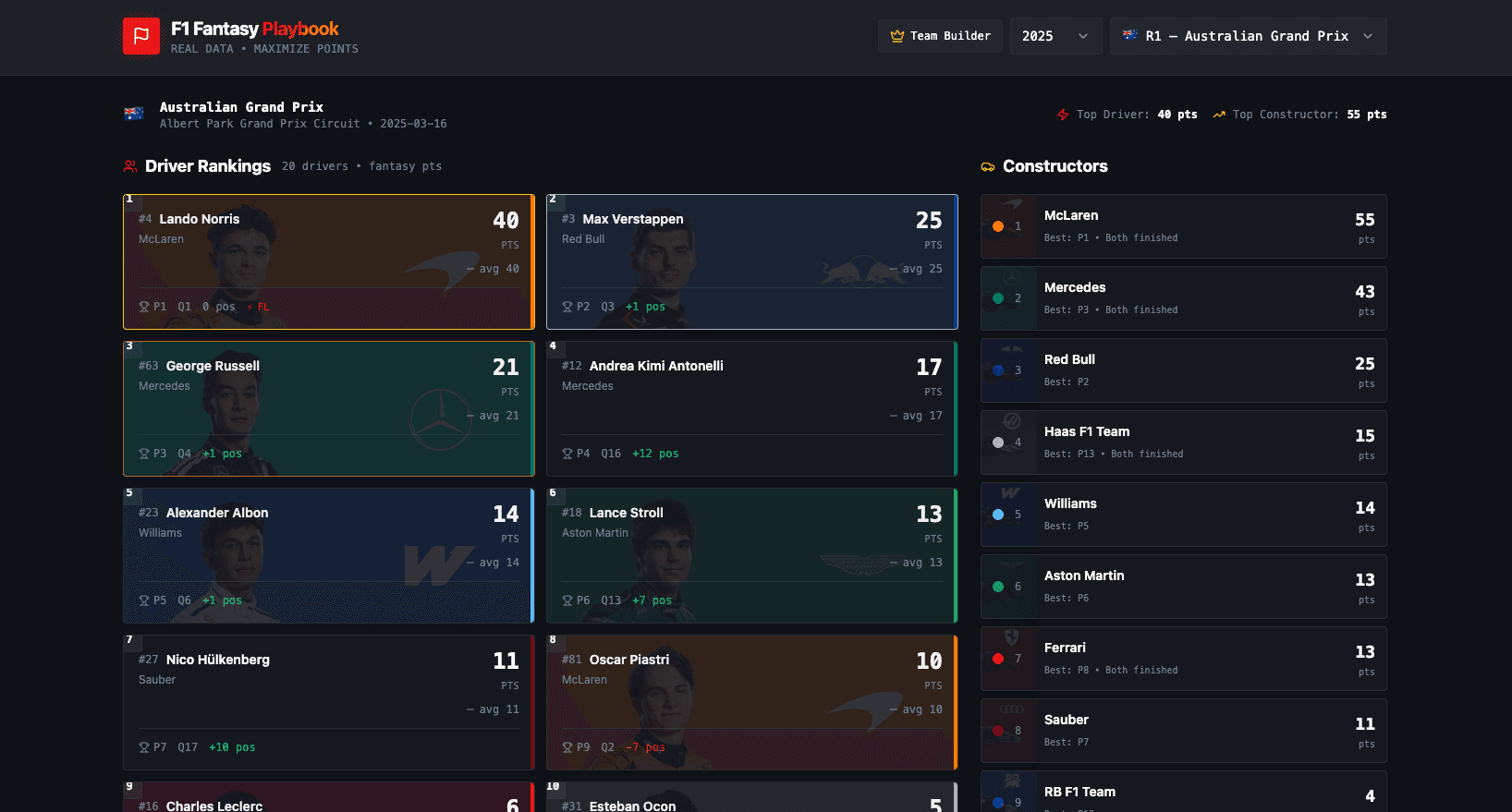
The main view shows every completed race from 2022–2025. For each race, every driver and constructor is ranked by their fantasy points that weekend — accounting for qualifying position, race finish, positions gained, fastest lap bonus, and DNF penalties. A season selector and race selector let you drill into any round instantly.
Team Builder
The Team Builder is the core utility feature. It takes 2026 official prices, runs a greedy optimisation across all constructor pairs, and returns the highest-scoring team that fits within the budget cap. The algorithm tries every combination of two constructors, then fills the remaining budget with the five best-value drivers ranked by average fantasy points per million dollars — a value score designed to surface underpriced assets rather than just the highest scorers.
// Try every pair of constructors, greedily fill with best-value drivers
for (let i = 0; i < constructors.length; i++) {
  for (let j = i + 1; j < constructors.length; j++) {
    const remaining = budget - c1.price - c2.price;

    const picked = drivers
      .filter(d => d.price <= remaining)
      .sort((a, b) => b.valueScore - a.valueScore) // pts/$M
      .reduce(greedyPick, []);                      // take 5 that fit

    if (totalPoints > bestPoints) bestTeam = { picked, [c1, c2] };
  }
}
Live Data, No Manual Entry
All race results come directly from the Jolpica F1 API — a free, key-less REST API that mirrors the official Ergast dataset. TanStack Query v5 handles caching, background refetching, and loading/error states, so the data stays fresh without hammering the API.
2026 Visuals
Driver portraits and car renders are sourced from the official F1 CDN, mapped to each driver and constructor ID. They render as ghost overlays on the cards — giving the interface an official feel without any manual asset management.
Tech Stack
| Layer         | Choice                        |
| ------------- | ----------------------------- |
| UI            | React 18 + TypeScript         |
| Build         | Vite                          |
| Styling       | Tailwind CSS + shadcn/ui      |
| Animation     | Framer Motion                 |
| Data fetching | TanStack Query v5             |
| Data source   | Jolpica F1 API (free, no key) |
| Testing       | Vitest + Testing Library      |
| Deploy        | Vercel                        |
The stack was chosen for speed of iteration. shadcn/ui provides accessible, unstyled primitives that compose well with Tailwind, so I could build a polished dark-themed interface without writing a component library from scratch. Framer Motion handles the card entrance animations that make switching between races feel fluid rather than jarring.
AI-Assisted Development
This project was built as a deliberate test of what an AI coding assistant can and can't do on a real, greenfield product. The honest answer is: it depends entirely on what you're asking it to do.
Where Copilot genuinely accelerated the work
Codebase exploration. Dropped into an unfamiliar project, Copilot mapped the file structure, identified the tech stack, and surfaced the relevant files — before I'd read a single line. For any project onboarding scenario, this is a meaningful time save.
Multi-file edits that stay consistent. When I updated the 2026 driver roster — new teams, new drivers, reshuffled prices — Copilot updated the price maps, driver ID mappings, type definitions, and UI references across three files simultaneously. Everything stayed in sync. Doing that by hand would have meant hunting for every reference manually.
Wiring data into existing components. I dropped two JSON files containing image URLs into the chat. Copilot mapped them to the correct driver and constructor IDs and wired them into the card components as ghost overlays. No manual matching required.
Business logic changes. Switching the Team Builder from 1 constructor to 2 (which the official rules require) meant touching the type definitions, the algorithm, and the UI all at once. Copilot handled all three in one pass.
Specs and documentation. The full SPEC.md for this project was generated from the codebase — accurate, structured, and useful enough that you could hand it to a different AI tool and ask it to rebuild the app from scratch.
Where you still have to lead
Domain knowledge. Copilot does not know that Cadillac entered F1 in 2026, or that Sergio Perez moved there from Red Bull, or what the correct official prices are. I had to provide that data. Garbage in, garbage out.
Product decisions. What should the app actually do? Which metric matters for "value"? Should the Team Builder optimise for average points or peak points? These are product questions, not code questions. AI can implement whatever you decide, but it won't decide for you.
Verification. Copilot's fantasy points logic needed checking against the official F1 Fantasy scoring rules. The code looked correct; whether it was correct required me to read the rules and compare. AI-generated logic still needs human review, especially for domain-specific calculations.
Prompt quality. Vague prompts produce vague code. Every time I was specific — "update the constructor price map, the driver-to-constructor ID map, and the TeamBuilder UI to support 2 constructors instead of 1" — I got exactly what I wanted. Every time I wasn't, I got a plausible but incomplete answer.
"AI didn't replace the developer — it removed the friction between idea and working code."
Reflections
The app went from concept to deployed product in a single session. That's the headline. But the more interesting observation is about what the session actually consisted of: most of my time was spent on product thinking, domain research, and verification — not typing code. The AI handled the mechanical parts. I handled the decisions.
That split feels like the right mental model for AI-assisted development in 2026. The bottleneck has shifted from "can I write this code" to "do I know what I want the code to do." The developers who benefit most from these tools are the ones who can answer that question precisely.
Links
- GitHub: github.com/YKehinde/f1-fantasy-edge
- Live app: https://f1-fantasy-edge.vercel.app/
- Spec:
SPEC.mdin the repo root